
CRM · Release Notes
What's New in v1.6.0
Welcome to the latest CRM release. This release introduces a range of enhancements across the CRM web and mobile applications aimed at improving flexibility, usability, and operational efficiency. Key updates include support for Task field configuration and pipeline stage management, personalized view creation across Masters and Tickets, enhanced organization-wise cost reporting, actionable mobile notifications with direct ticket navigation, and contract editing capabilities in the mobile app. These enhancements provide users with greater customization, streamlined workflows, and improved access to critical information, resulting in a more productive and seamless user experience.
Task Field Configuration Enhancement
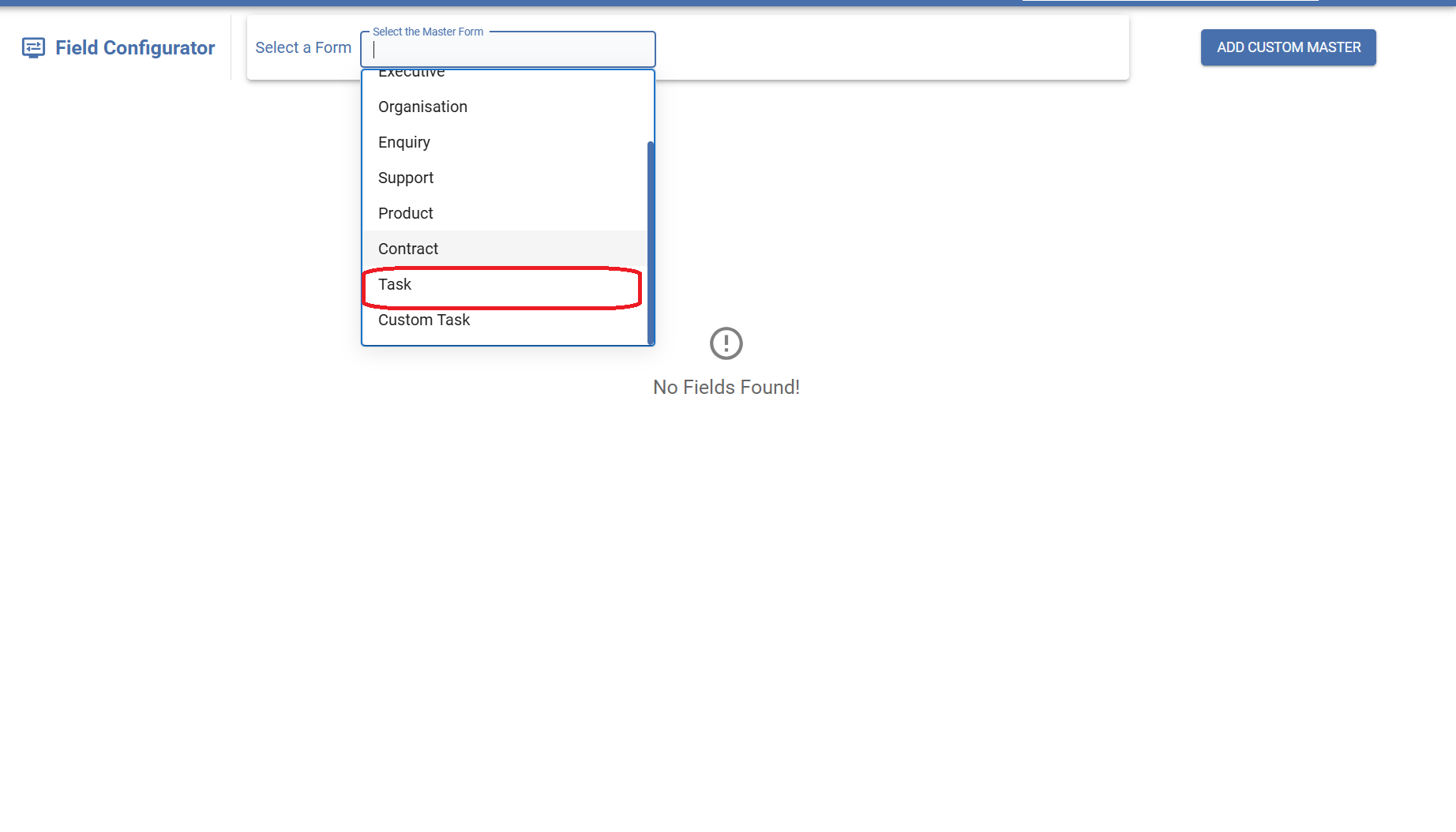
EnhancementEnhanced Field Configuration now supports the Task module, allowing administrators to create custom fields and modify default field labels, similar to other configurable CRM modules.
Overview
The Task module has been added to the Field Configuration section of the CRM. Administrators can now manage Task fields in the same way as other supported entities/modules. This enhancement provides flexibility to customize task-related information according to business requirements by adding custom fields and renaming default field labels.
Functionality
- Added Task module in Field Configuration.
- Users can create and manage custom fields for Tasks.
- Default Task field labels can be renamed as per business requirements.
- Configured fields and label changes are reflected across Task create, edit, and detail screens.
- Functionality is consistent with other modules already available in Field Configuration.
Example
A company wants to track the type of follow-up performed for each task. An administrator creates a custom dropdown field "Follow-up Type" (Call, Email, Meeting) and renames the default field "Subject" to "Task Name". Users will then see these changes while creating and managing Tasks in the CRM.
Task Pipeline Stage Configuration
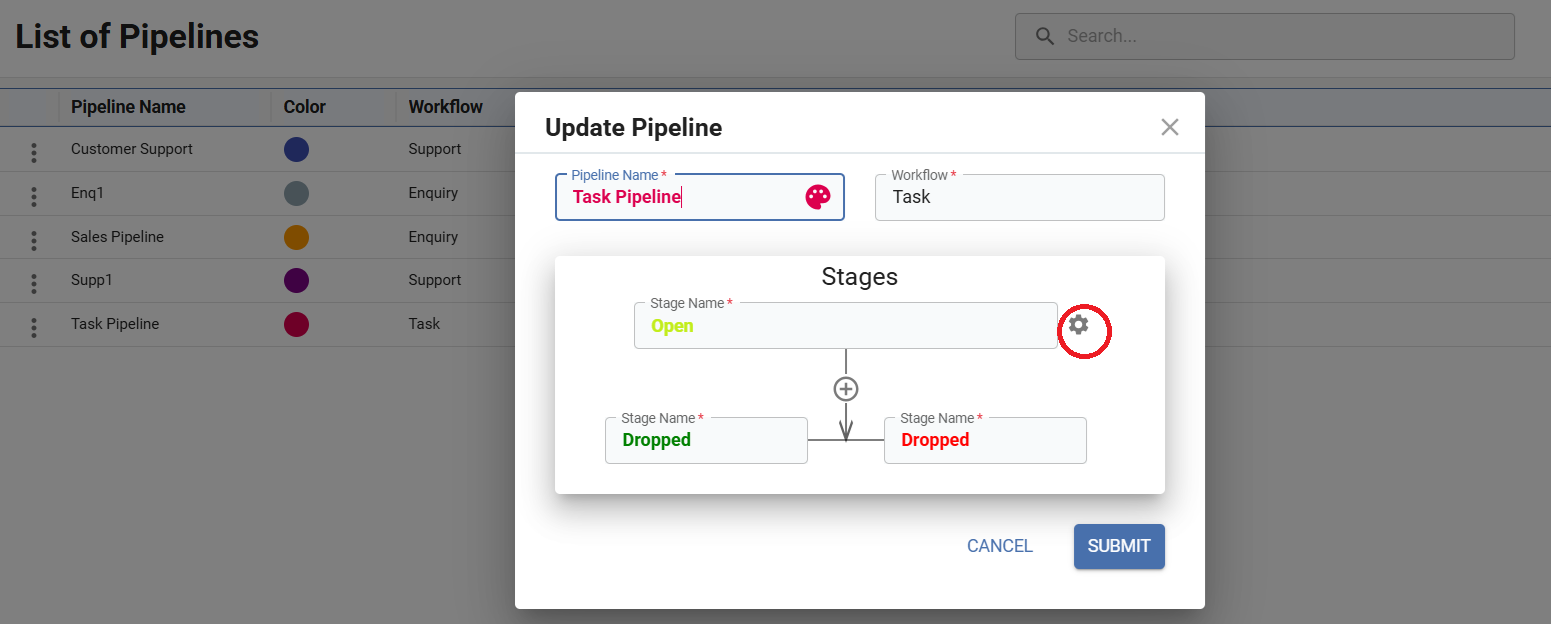
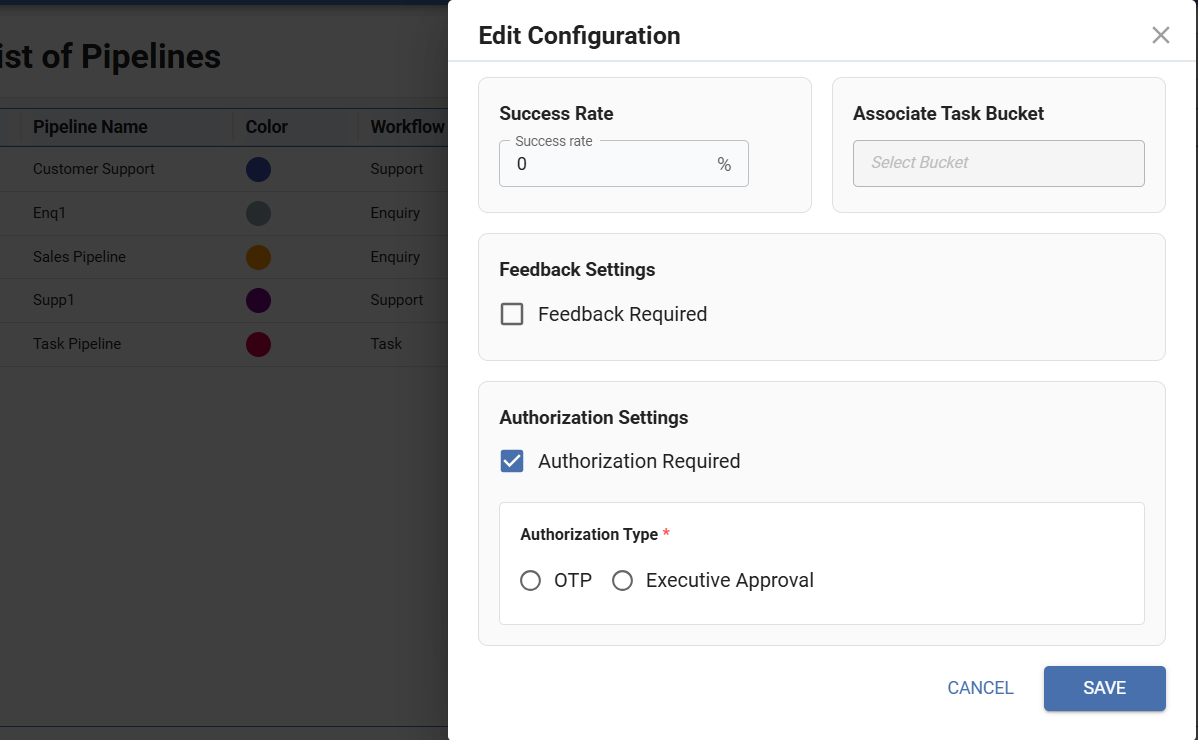
EnhancementEnhanced Task Pipeline Stage Configuration to support stage-level settings such as Success Rate, Feedback Requirement, and Authorization Configuration, similar to existing Enquiry and Support stage configurations.
Overview
The Task Pipeline now supports advanced Stage Configuration capabilities that are already available in Enquiry and Support pipelines. Administrators can configure stage-specific settings to control task progression, approval workflows, and completion criteria.
Functionality
- Added Stage Configuration support in the Task Pipeline, similar to Enquiry and Support pipelines.
- Users can configure Success Rate for each stage.
- Users can associate a Task Bucket with a stage.
- Option to make Feedback mandatory for a stage.
- Option to enable Authorization Required for a stage.
- Authorization can be configured through OTP or Executive Approval.
- For OTP authorization, the source can be selected as Customer, Reporting Manager, or Executive.
- All configurations are applied at the stage level and control task progression through the pipeline.
Example
Business Scenario
A company wants to ensure that high-value customer tasks are approved before completion.
Configuration:
For the "Task Closure" stage:
- Success Rate: 90%
- Feedback Required: Enabled
- Authorization Required: Enabled
- Authorization Type: OTP
- OTP Source: Customer
View Management Across Masters and Tickets
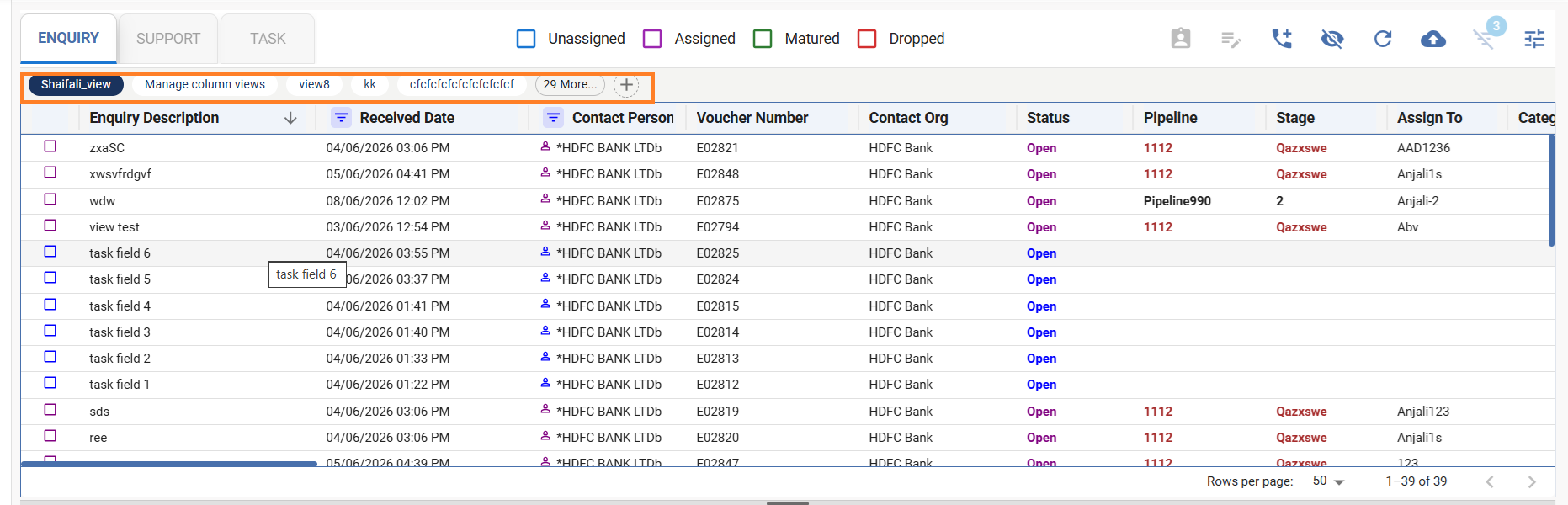
NewIntroduced a View Management feature across all Masters and Tickets, allowing users to create, save, edit, and manage multiple personalized views using custom filters and column visibility settings.
Overview
The new View feature enables users to customize how records are displayed in any Master or Ticket module. Users can create and save multiple views based on their preferred filters and visible columns, making it easier to access and work with frequently used data sets.
Functionality
- Users can create and save multiple views for a module.
- Each view can have its own filters and column visibility settings.
- Saved views can be reused and switched quickly.
- Existing views can be edited and updated as needed.
- Helps users personalize data display for different workflows.
Example
Module: Contact Master
A user creates the following views:
1. Active Customers
- Filter: Status = Active
- Visible Columns: Contact Name, Organization, Mobile Number
2. Recently Added Contacts
- Filter: Created Date = Last 30 Days [using an option of 'Auto-update dates inside date filters']
- Visible Columns: Contact Name, Email, Created Date
The user can easily switch between these saved views and update the filters or column settings whenever required, eliminating the need to configure them repeatedly.
Organization-wise Total Cost Reporting
EnhancementIntroduced Total Cost (By Organisations) report in Enquiry and enhanced Support reports by replacing Expense (By Organisations) with Total Cost (By Organisations), providing organization-wise consolidated cost analysis.
Overview
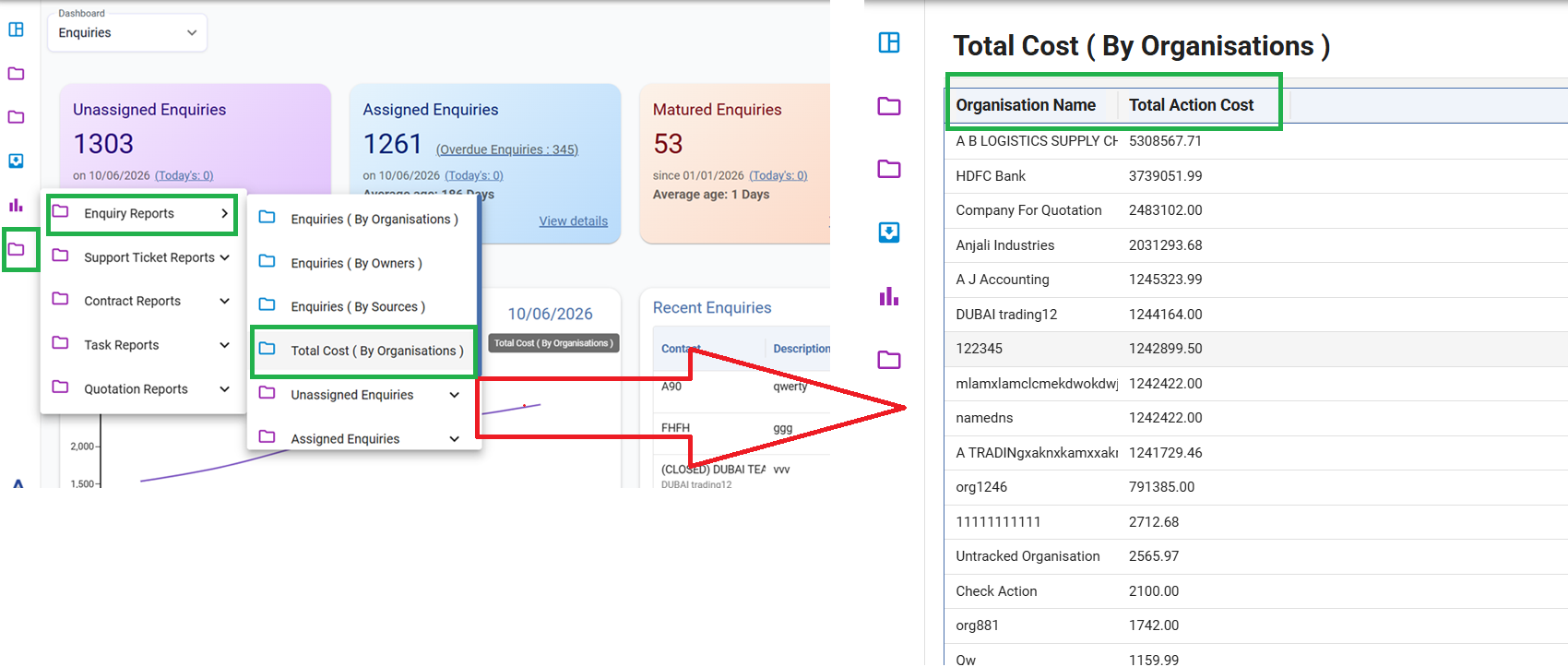
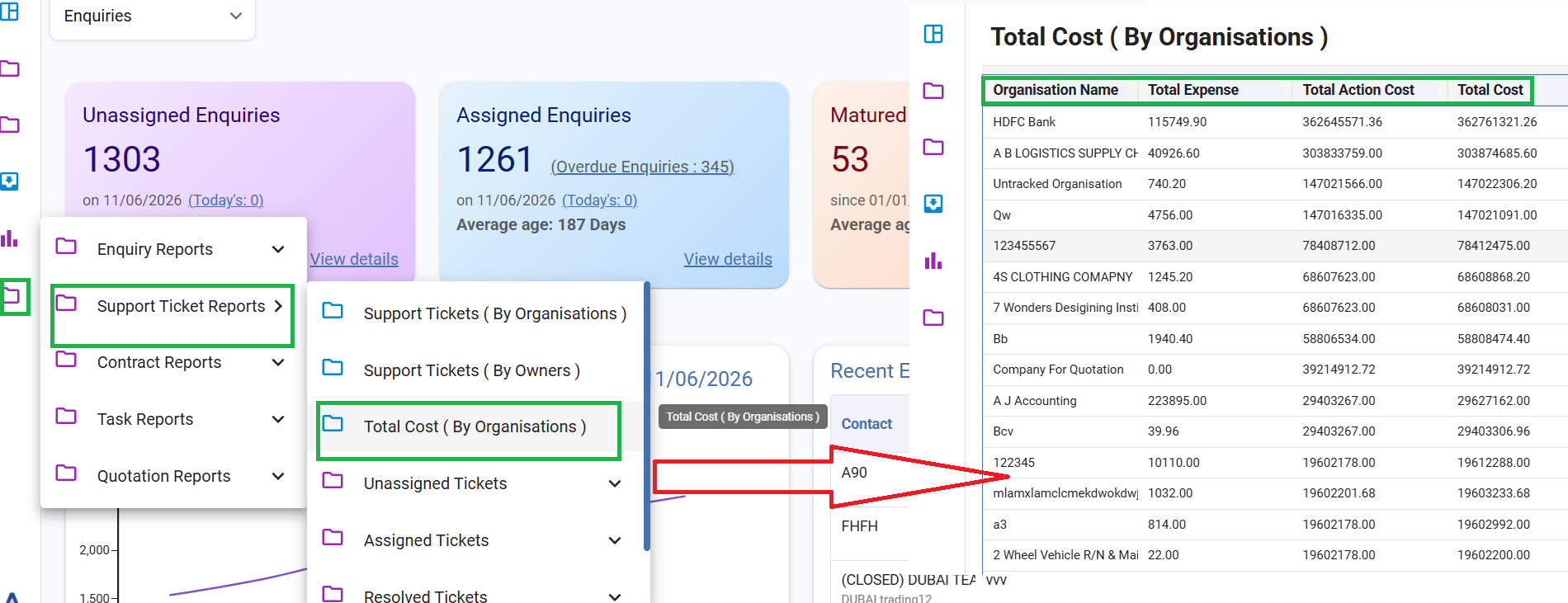
A new Total Cost (By Organisations) report has been added to the Enquiry reports, and the existing Expense (By Organisations) report in Support has been renamed and enhanced to Total Cost (By Organisations). This report provides a consolidated view of costs incurred against each organization based on associated contact persons.
Functionality
Enquiry Reports
- Added Total Cost (By Organisations) report.
- Displays the sum of all Action Costs for each organization.
- Costs are aggregated based on contact persons linked to the same organization.
- Provides organization-wise cost visibility for enquiries.
Support Reports
- Renamed Expense (By Organisations) to Total Cost (By Organisations).
- Displays the combined total of Expense Cost and Action Cost for each organization.
- Costs are calculated by grouping all support records associated with contact persons belonging to the same organization.
- Enables a more comprehensive analysis of organization-wise support costs.
Example
Enquiry:
Organization ABC Pvt. Ltd. has three contact persons with enquiry actions having costs of ₹500, ₹1,000, and ₹1,500.
Total Cost (By Organisations) report will display: ₹3,000 (Sum of Action Costs only)
Support:
Organization ABC Pvt. Ltd. has:
- Expense Cost = ₹2,000
- Action Cost = ₹1,500
Total Cost (By Organisations) report will display: ₹3,500 (Expense Cost + Action Cost combined)
Mobile Notification-Based Ticket Navigation
EnhancementEnhanced the mobile app notifications to support direct navigation to the corresponding ticket's Status Update Form, enabling users to take immediate action from notifications.
Overview
The mobile application has been enhanced to provide actionable notifications. Users receiving notifications related to ticket creation, assignment, status updates, or reminders can now directly access the respective ticket's Status Update Form by tapping the notification, improving responsiveness and reducing navigation effort.
Functionality
- Notifications for ticket creation, ticket assignment, status updates, and reminders are now clickable.
- On tapping a notification, the user is redirected directly to the associated ticket's Status Update Form.
- Users can view ticket details and perform status updates without manually searching for the ticket.
- Supports faster ticket handling and improves user productivity.
- Ensures a seamless workflow between notifications and ticket actions within the mobile application.
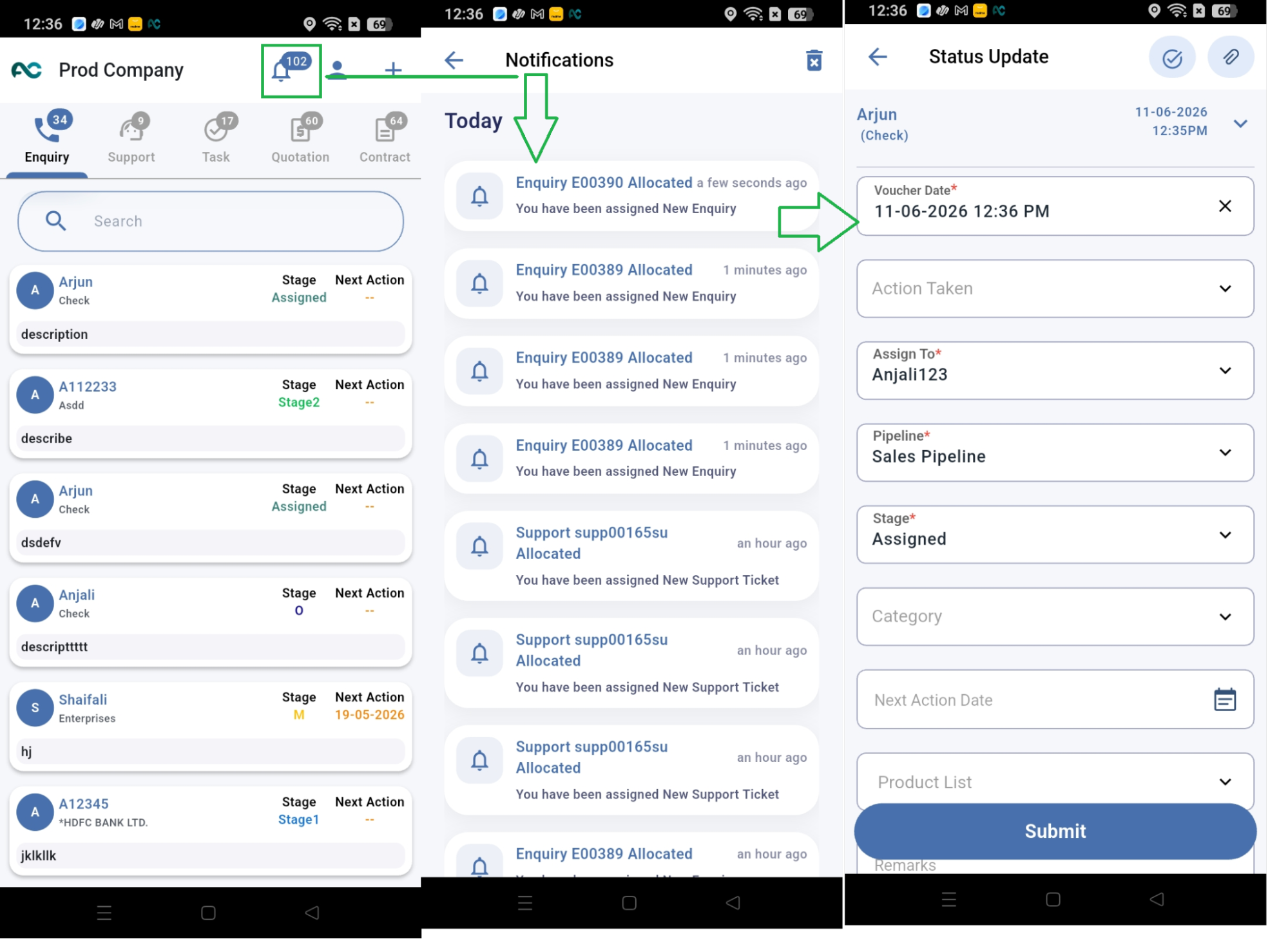
Flow: Notification Icon → Notification List → Status Update Form
Example
A support engineer receives a notification:
"Support Ticket #SUP-1025" has been assigned to you.
When the user taps the notification, the mobile app automatically opens the Status Update Form for ticket SUP-1025, allowing the engineer to immediately update the status, add remarks, or perform necessary actions without navigating through the ticket list.
Contract Editing in Mobile Application
EnhancementEnhanced the mobile application to allow users to edit existing Contracts, providing greater flexibility in managing contract information.
Overview
The mobile application has been enhanced with contract editing capabilities. Users can now modify existing contract details directly from the app, eliminating the need to switch to the web platform and enabling on-the-go contract management.
Functionality
- Users can open and edit existing contracts from the mobile app.
- Contract information can be updated as permitted by user roles and permissions.
- Changes made to contracts are saved and reflected across the system.
- Provides a seamless and efficient contract management experience on mobile devices.
- Reduces dependency on the web application for contract modifications.
Example
A sales executive identifies that the contract end date and billing amount of a customer agreement need to be updated. Using the mobile app, the executive opens the existing contract, edits the required details, and saves the changes. The updated information is immediately available throughout the CRM system.
Default & Custom Field Mapping in Notification Configuration
EnhancementEnhanced Notification Configuration to display variable mappings for both default and custom fields, enabling easier configuration of Email and WhatsApp notifications.
Overview
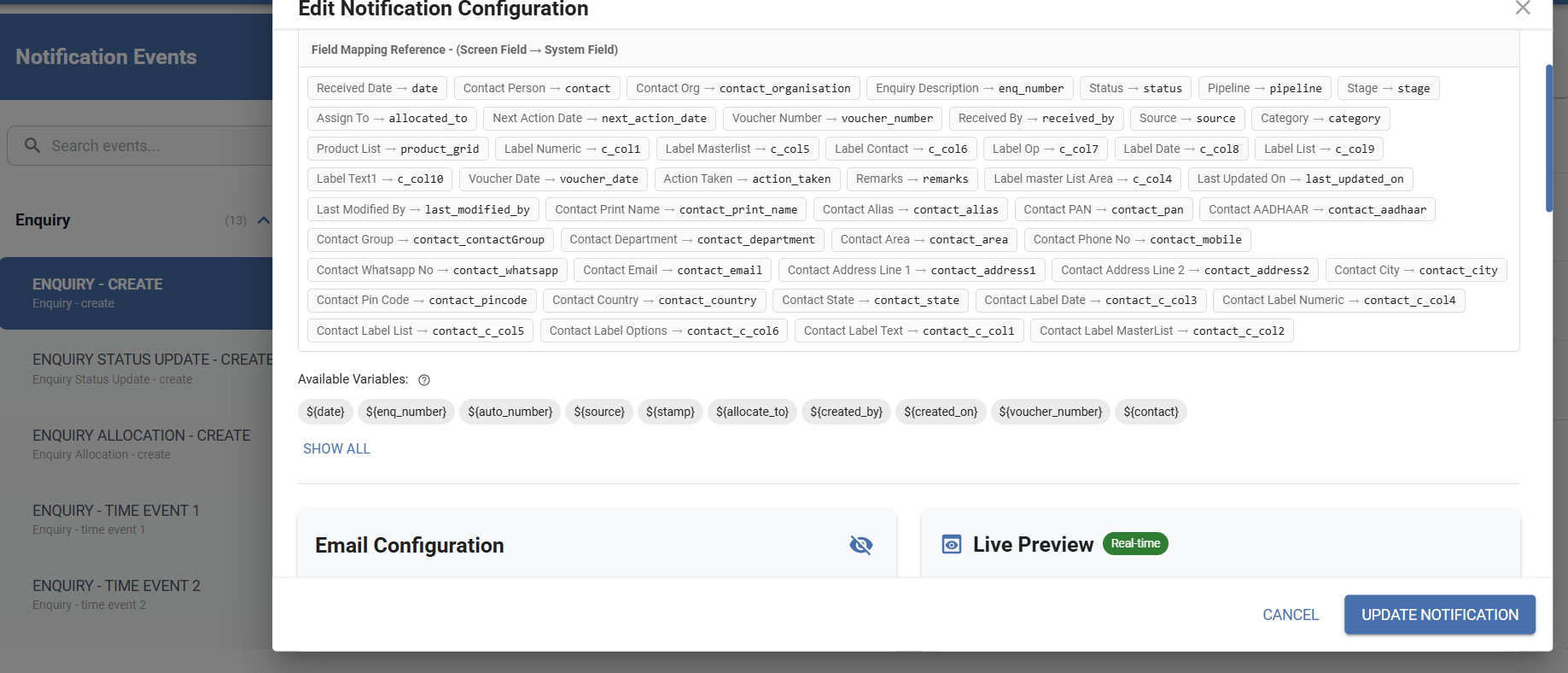
Notification Configuration has been enhanced to provide clear visibility of variable mappings for both default and custom fields. Users can now easily identify which variable corresponds to which field while configuring Email and WhatsApp templates, improving usability and reducing mapping errors.
Functionality
- Variable mappings are now visible within Notification Configuration.
- Supports mapping of both default fields and custom fields.
- Users can view the field associated with each variable.
- Available for both Email and WhatsApp notifications.
- Simplifies template creation and maintenance.
- Helps ensure accurate and consistent notification content.
Example
While configuring an Email notification for Support tickets, a user adds the variable {{CustomerName}}, which is shown as mapped to the default Contact Name field. The user also adds {{InstallationDate}}, which is mapped to a custom field created in Field Configuration. This allows the user to easily verify all mappings before saving the Email or WhatsApp template.
Support Ticket Bulk Upload
NewAdded bulk upload capability for Support tickets, allowing users to import support data through Excel files with the help of a downloadable sample template.
Overview
The Support module has been enhanced to support bulk data import through Excel. Users can now upload multiple Support records at once, reducing manual effort and improving data entry efficiency. A sample file is also provided to guide users on the required format before performing the upload.
Functionality
- Added Excel-based bulk upload for Support tickets.
- Users can download a sample file to understand the required data format.
- Multiple Support records can be imported in a single operation.
- Helps reduce manual data entry and save time.
- Ensures consistent data structure during bulk uploads.
Example
A company has 200 support requests maintained in an Excel sheet. The user first downloads the sample file to verify the required format, populates the sheet with the support data, and uploads it through the Support > Upload File option. All valid records are then created as Support tickets in the CRM in a single upload.
Enhanced Attachment Support
EnhancementEnhanced attachment functionality to support ZIP, MP3, and MP4 file formats across the CRM and mobile application.
Overview
The attachment feature has been enhanced to support additional file formats, including ZIP, MP3, and MP4. Users can now upload these files wherever the attachment option is available, both in the CRM and the mobile application, enabling easier sharing of compressed files, audio recordings, and video content.
Functionality
- Added support for ZIP, MP3, and MP4 file formats.
- Available across both the CRM and mobile application.
- Supported in all modules and forms where the attachment icon is present.
- Enables users to attach compressed files, audio files, and video files along with existing supported formats.
- Provides greater flexibility for storing and sharing related information.
Example
A support engineer needs to share a screen recording and diagnostic logs for a ticket. The engineer can now attach an MP4 video containing the screen recording and a ZIP file containing log files directly to the Support ticket. Similarly, a field executive using the mobile app can upload an MP3 voice note while updating an Enquiry or any ticket, making relevant files easily accessible from the CRM.